Welcome to CURISTICA Hazard Log Visualiser
A cloud-based platform for managing medical device hazard logs in compliance with DCB0129, DCB0160, and ISO 14971.
📖 Complete User Manual Available!
For detailed step-by-step instructions, workflows, and troubleshooting, see: USER_GUIDE.md
The guide covers everything from importing data to exporting regulatory reports.
🚀 Quick Start
First Time Users:
- Select a product from the dropdown in the header above
- Explore the tabs below to view your hazard log in different formats
- Import new data via the Import tab (Excel → Database)
📤 Need to import your hazard log?
Go to the Import tab → Select Excel file → Normalize → Convert → Upload to Database
📑 Platform Tabs
2️⃣ Hazard Log
Your main workspace • View, Edit, Export • Database persistence
What is this tab for?
View: Hierarchical display with search, statistics, and pagination
Edit: Click ✏️ EDIT MODE in the floating sidebar to add/modify/delete items
Save: Click 💾 Save Changes to write to database (all users see changes)
Export: Download JSON or Excel (Data format for analysis, Report format for presentations)
Protection: Auto-save every 30 seconds • Undo/Redo (Ctrl+Z/Y) • Warning on page close
3️⃣ Bow-Tie Diagram
Simple visual: Causes → Controls → Hazard → Harm • Best for presentations
4️⃣ Network Graph (D3.js)
Interactive bow-tie with zoom/pan • Risk color-coding (1-5 scale)
5️⃣ Network Graph (Cytoscape.js) ⭐
Advanced graph • Shared control detection (orange border) • Click controls to highlight
What makes this special?
Shared Control Detection: Automatically identifies controls that mitigate multiple causes (shown with orange border and count)
Interactive Highlighting: Click any control to see its relationships with golden highlights
Split Layout: Graph view (left) + Detail panel (right) for exploring complex relationships
Best For: Finding shared controls and understanding control-to-cause mappings
6️⃣ Import
Convert Excel to database • Normalize → Convert → Upload
7️⃣ Settings
Database management • View products • Delete (requires typing "DELETE")
8️⃣ Evidence Tracker
Track controls and evidence grouped by responsibility • Bulk actions • Coverage metrics
How do I use it?
- Responsibility grouping: Controls automatically grouped by CONTROL_RESPONSIBILITY field (Manufacturer, Deployer, Clinical Team, or custom)
- Summary matrix: At-a-glance heatmap showing control counts by responsibility and workflow state; click cells to drill in
- Inline updates: Change control or evidence workflow status via dropdown; saves immediately with "saving…" / "saved" feedback
- Bulk actions: Select multiple controls and change workflow, reassign responsibility, or export CSV in one operation
- Merge/rename tool: Consolidate fragmented responsibility values (e.g., "Mfr" / "Manufacturer" → one bucket)
- Coverage tracking: See % of controls verified per bucket, identify bottlenecks in evidence chase-up
✅ Common Workflows
Adding New Hazards/Controls
- Go to Hazard Log tab
- Click ✏️ EDIT MODE in the floating sidebar (right side)
- Click ➕ Add buttons to add new items
- Click 💾 Save Changes to write to database
- Switch tabs to see changes visualized
Editing Existing Items
- Enter edit mode (✏️ EDIT MODE button)
- Click any field with blue dashed border to edit
- Type changes and click away to save to memory
- Use Ctrl+Z to undo, Ctrl+Y to redo
- Click 💾 Save Changes when ready
Importing New Product
- Go to Import tab
- Select Excel file (.xlsx)
- Click Normalize → Convert to JSON
- Fill in product metadata (name, version, DCB)
- Click Upload to Database
- Product appears in header dropdown immediately
Exporting Reports
- Go to Hazard Log tab
- Click 📊 Export Excel (Report) for NHS Standard format
- Or click 📊 Export Excel (Data) for flat analysis format
- File downloads with 4 tabs: Summary, Hazard Log, Risk Matrix, Controls
- Use Report format for regulatory submissions (DCB0129/DCB0160)
Chasing Evidence Gaps by Responsibility
- Go to Evidence Tracker tab (Analysis section)
- Scan the summary matrix for bottleneck cells (e.g., high count in "Awaiting Evidence" column)
- Click a cell in the matrix → view scrolls to show controls in that responsibility + workflow state combination
- Expand a responsibility bucket to see all controls and their linked evidence items
- Select multiple controls using row checkboxes or select all in bucket checkbox
- Use Change Workflow ▾ to bulk-update their status or Export CSV for external chase-up
- Or update inline: click any control's workflow dropdown to change status immediately (saves automatically)
⚠️ Deleting a Product (PERMANENT)
- Go to Settings tab → Click 🔄 Refresh
- Find product in table, click 🗑️ Delete
- Read warning carefully
- Type exactly DELETE (all caps) in the input field
- Press Enter or click Delete Project button
⚠️ WARNING: Permanently deletes ALL hazards, causes, controls, evidence, and relationships. Cannot be undone! Export JSON backup first.
💡 Key Features to Remember
- ☁️ Database Sync: Edits persist across sessions and are visible to all users instantly
- 👁️ Live Preview: See edits in all tabs before clicking Save Changes
- ↶ Undo/Redo: Full change history with Ctrl+Z (undo) and Ctrl+Y (redo)
- 💾 Auto-Save: Browser backup every 30 seconds (not database - click 💾 Save for that)
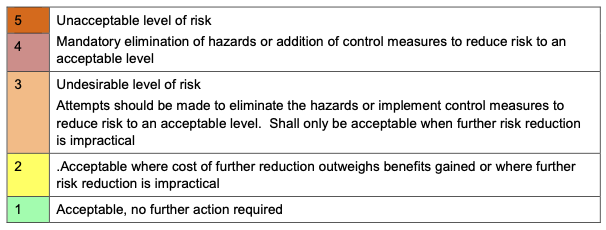
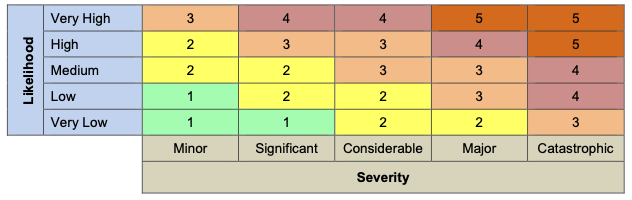
- 🎨 Risk Color Coding: 1 Green 2 Yellow 3 Orange 4 Light Red 5 Dark Red
- 🔗 Shared Controls: Orange border in Cytoscape graph = control protects multiple causes
📖 Need More Help?
For detailed instructions, see USER_GUIDE.md
- Step-by-step workflows
- Troubleshooting guide
- NHS Risk Matrix explanation
- Compliance requirements (DCB0129, DCB0160, ISO 14971)
- Best practices and tips
✨ Ready to Start?
Select a product from the dropdown above or click the Import tab to upload your hazard log.
MCP Tools Guide
A practical guide to the Model Context Protocol (MCP) tool ecosystem available within the Claude Desktop app for CURISTICA Nexus.
What are MCP Tools?
MCP is an open standard that allows AI assistants like Claude to connect securely to external data sources and services. Rather than copying data into prompts manually, MCP servers give Claude direct, structured access to databases, APIs, and registries.
You simply describe what you need in natural language, and Claude selects and calls the right tools automatically.
Why MCP Matters for Clinical Safety
Clinical safety work involves cross-referencing multiple data sources: hazard logs, prescribing data, CQC ratings, DSPT compliance, company records, and more. MCP tools let you query all of these from a single conversation, reducing context-switching and manual lookup.
Setting Up MCP Servers
MCP servers are configured in the Claude Desktop settings file:
- macOS:
~/Library/Application Support/Claude/claude_desktop_config.json - Windows:
%APPDATA%\Claude\claude_desktop_config.json
Each server entry specifies how to launch the server process and any required credentials. A typical configuration block looks like this:
{
  "mcpServers": {
    "hazard-log": {
      "command": "node",
      "args": ["path/to/hazard-log-server/index.js"],
      "env": {
        "API_KEY": "your-api-key-here"
      }
    }
  }
}
After editing the configuration file, restart Claude Desktop for changes to take effect. If a server fails to connect, check the Claude Desktop developer console (Help > Toggle Developer Tools) for error messages.
Where to Find the CURISTICA MCP Servers
All CURISTICA MCP servers are available from the CURISTICA GitHub organisation. Each repository contains installation instructions, environment variable requirements, and example configurations.
- Hazard Log (CURISTICA Nexus) — Full hazard log database access
- Clinical Safety Case Analyser — DCB0129/DCB0160 assessment engine
- OpenPrescribing — NHS prescribing data
- Fingertips (OHID) — Public health indicators
- NHS GP System — GP practice IT system lookup
- DSPT Checker — Data Security and Protection Toolkit
- CQC Checker — Care Quality Commission inspection data
- Companies House — UK company information
- DPIA (Nexus Data Tool) — Data Protection Impact Assessment management
Tool Reference
Hazard Log (CURISTICA Nexus)
The core of the Nexus platform — full read/write access to your clinical safety hazard log database covering the entire DCB0129/DCB0160 data model.
View capabilities
Products & Metadata: List products, retrieve summaries with entity counts and statistics, update metadata (name, description, version, DCB standard), create new products or import full V2 normalised JSON.
Hazards: Full CRUD operations. Fields include description, title, category, harm, clinical impact, initial and residual risk scores (severity, likelihood, justification), status, and notes. Filter by minimum risk score with pagination.
Causes, Controls & Evidence: Full CRUD for each entity type with relationship data. Controls include mechanism, type, category, and responsibility fields. Evidence includes type, URL, and source file.
Risk Analysis & Compliance: Calculate and validate NHS Risk Matrix scores, get risk reduction recommendations, analyse control coverage and identify gaps, check compliance against DCB0129, DCB0160, and ISO 14971.
Gap Detection: Identify hazards without causes, causes without controls, controls without evidence, and high-risk hazards (residual risk score of 4 or above). List shared controls used by multiple causes.
SPID & SCID Documents: Full CRUD for Structured Product Information Documents and Structured Context Information Documents with v1.0/v2.0 schema support and product linking.
Clinical Safety Officers: List all CSOs and retrieve detailed profiles including assigned products.
Hazard Validation: Validate individual hazards for completeness, quality standards, and regulatory compliance with scored reports and recommendations.
Clinical Safety Case Analyser
Assessment engine for evaluating clinical safety documentation against NHS standards (154 criteria across 8 sections).
View capabilities
Section-by-Section Assessment: Eight discrete tools covering product definition (12 criteria), safety case narrative (18 criteria), hazard log and risk assessment (32 criteria), controls and mitigation (25 criteria), deployment readiness for DCB0160 (27 criteria), post-deployment monitoring (18 criteria), governance (9 criteria), and AI/ML/SaaS considerations (13 criteria).
Submission Assessment: Assess manufacturer submissions against DCB0129 and deployment readiness against DCB0160, with support for different organisation types.
Gap Analysis & Validation: Identify missing or incomplete documents and critical gaps. Validate NHS Risk Matrix calculations across an entire hazard log. Compare uploaded documents with the database version.
Reporting: Generate executive summaries, section summary tables (markdown, JSON, or HTML), lists of critical findings, prioritised recommendations, and full 10-section assessment reports.
OpenPrescribing
NHS prescribing data from the OpenPrescribing project, covering GP practice-level prescribing across England.
View capabilities
Drug Search: Search for drugs, chemicals, and products by name or BNF code. Returns BNF chemicals (with section), products, and product formats.
Organisation Search: Search for NHS organisations (Sub-ICB Locations, GP practices) by name or code.
Spending Data: Retrieve total national prescribing spending by month, filtered by BNF code at any level. Break spending down by organisation type with optional filtering.
Organisation Details: Get list size (registered patients) and ASTRO-PU data for GP practices or Sub-ICB Locations.
Fingertips (OHID)
OHID Fingertips public health data platform, covering hundreds of indicators across GP practices, Sub-ICB Locations, ICBs, regions, and more.
View capabilities
Area & Indicator Discovery: Search for areas by name or code (GP practices, ICBs, regions, counties, PCNs), list all area types, profiles, and retrieve indicator metadata.
Practice-Level Data: GP Practice Summary data (demographics, deprivation, life expectancy, QOF points) and QOF disease prevalence data by ODS code.
Flexible Queries: Get latest data for specific indicators at any area level, retrieve child area data, historical trends as CSV, and profile group data for specific areas.
NHS GP System
Look up GP practices and their IT system suppliers (TPP, EMIS, CEGEDIM, MICROTEST).
View capabilities
Practice Lookup: Search by ODS code or name. Returns practice name, IT system supplier, and ICB commissioner.
System Filtering: Get all GP practices using a specific IT system for understanding coverage and planning integrations.
Statistics: National distribution of GP IT systems across England with total practice count and breakdown by system.
DSPT Checker
Check Data Security and Protection Toolkit compliance for NHS organisations.
View capabilities
Search: Search for NHS organisations by name or ODS code and get their current DSPT status, publication date, primary sector, and ICB.
Detailed Status: Full details for a specific organisation by ODS code, including name, address, sector, and optionally the full publication history across all years.
CQC Checker
Care Quality Commission inspection data for health and social care providers in England.
View capabilities
Search: Search the CQC Care Directory by name, postcode, or ODS code (~120,000 locations).
Location Details: Comprehensive information including overall rating, key question ratings (Safe, Effective, Caring, Responsive, Well-led), service-level ratings, inspection reports, and rating history.
Provider Details: Organisation type, ownership, Companies House and charity numbers, CQC ratings, location IDs, regulated activities, and reports.
Companies House
Search and retrieve UK company information from Companies House.
View capabilities
Company Search & Profile: Search by name or number. Full profiles with registered office, incorporation date, company type, status, SIC codes, and accounts information.
Officers & Filing History: List directors, secretaries, and other officers. Retrieve filing history with optional category filtering.
Persons with Significant Control: PSC data including individuals or entities with significant control (e.g. owning more than 25% of shares or voting rights).
DPIA (Nexus Data Tool)
Manage Data Protection Impact Assessments linked to products and deployment sites.
View capabilities
DPIA Management: Full CRUD operations. List all DPIAs with summary information, get DPIAs linked to a specific product, or find the DPIA for a specific product-deployment site combination.
Validation & Compliance: Validate completeness (0-100 score with recommendations). Check compliance against ICO template requirements, GDPR Article 35, and WP248 guidelines.
Risk Analysis: Analyse all risks including unmitigated risks with recommendations. Evaluate whether processing triggers the DPIA requirement based on WP248 criteria.
Cross-Referencing: Find hazard log entries that relate to data processing described in a DPIA. Compare DPIA risk assessments with clinical hazard risk assessments for alignment.
Best Practice
Start with Discovery
Before diving into detailed queries, use summary and listing tools to orient yourself. For example, call get_product_summary before exploring individual hazards, or list_dpias before drilling into a specific assessment.
Be Specific in Your Requests
Rather than “tell me about the hazard log,” try “list all high-risk hazards for product 1 with a residual risk score of 4 or above” or “check DCB0129 compliance for product 3.” The more specific you are, the fewer round-trips are needed.
Combine Tools for Richer Insight
The real power of the MCP ecosystem is cross-referencing. You might look up a GP practice by ODS code, check its CQC rating, verify its DSPT compliance, review its QOF prevalence data, examine its prescribing patterns, and identify the IT system it uses — all in a single conversation.
Use Compliance Tools Regularly
Do not wait until a submission deadline to check compliance. Run compliance checks periodically during development. Use gap detection tools — hazards without causes, causes without controls, controls without evidence — as a regular hygiene check.
Understand the Data Sources
Each MCP server connects to a different upstream source with its own update cadence. OpenPrescribing data is typically a few months behind due to NHS processing timelines. CQC ratings reflect the most recent published inspection. DSPT status is published annually.
Security & Access
MCP servers run locally on your machine and connect to external APIs using credentials you configure. Treat API keys as sensitive data: do not commit them to version control, and use environment variables rather than hardcoding them in configuration files. Review each server's required permissions before granting access.
Quick Reference: Common Tasks
| Task | What to Ask Claude |
|---|---|
| View all products | “List all products in the hazard log” |
| Check compliance | “Check DCB0129 compliance for product 1” |
| Find gaps | “Show me causes without controls for product 2” |
| Assess a safety case | “Assess this CSCR against Section 2 criteria” |
| Look up a GP practice | “Look up GP practice G84015” |
| Check CQC rating | “What is the CQC rating for practice G84015?” |
| Verify DSPT status | “Check DSPT status for ODS code RJ1” |
| Search prescribing data | “Show metformin prescribing trends nationally” |
| Look up a company | “Search Companies House for Curistica” |
| Review a DPIA | “Validate completeness of DPIA dpia-001” |
| Cross-reference risks | “Compare DPIA risks with hazard log for product 1” |
| Find public health data | “Get QOF prevalence data for practice A81001” |
Further Reading
Import Hazard Log JSON
v2.0 normalized format
Drag & drop JSON file here
or click to browse
Supported: .json
Selected:
Import DPIA JSON
ICO-compliant DPIA schema
Drag & drop DPIA JSON here
or click to browse
Supported: .json
Selected:
Import SPID
Structured Product Information Document
Drag & drop SPID JSON here
or click to browse
Supported: .json
Selected:
Import SCID
Structured Context Information Document
Drag & drop SCID JSON here
or click to browse
Supported: .json
Selected:
Import Excel Hazard Log
Convert Excel to JSON format
Auto-detects column structure
Drag & drop Excel file here
or click to browse
Supported: .xlsx, .xls
Import Controls
Add controls to existing product
Drag & drop controls Excel here
or click to browse
Supported: .xlsx, .xls
Please select a JSON file to view
📋 No Hazard Log Data
Load a hazard log to start reviewing controls in Workshop mode.
Please select a JSON file to view
⋮⋮
Detail View
Detail View
Click on a node or edge to view details
Please select a JSON file to view
Please select a JSON file to view
View
Node Details
Nodes: 0
Edges: 0
View: Portfolio
Data Analyser
Load a hazard log file to see detailed statistics.
Load a hazard log to view evidence tracking data.
Export Options
Export your hazard log data in various formats. Customize filenames or use defaults with timestamp.
EXCEL
JSON
STANDALONE VIEWER
💡 Tips
- Leave filename blank to use default format:
hazard_log_YYYY-MM-DD - Custom filenames will automatically add the appropriate extension (.json or .xlsx)
- Timestamps ensure unique filenames and prevent overwriting existing files
- All exports use the currently loaded hazard log data
🗄️ DATABASE
Manage products, SPID documents, and SCID documents
📦 Products
Click "Refresh" to load products
📄 SPID Documents
Click "Refresh" to load SPID documents
📋 SCID Documents
Click "Refresh" to load SCID documents
🔄 Convert DCB 0129 to DCB 0160
Create a new DCB 0160 product by duplicating a DCB 0129 product and filtering for TRANSFERRED status hazards only. This workflow is commonly used when transitioning hazards from DCB0129 to DCB0160 standards.
Refresh to load available DCB 0129 products
New Product Metadata (DCB 0160)
ℹ️ How Conversion Works
- Only hazards with STATUS = "TRANSFERRED" will be included
- All causes linked to transferred hazards will be copied
- All controls linked to those causes will be copied
- All evidence linked to those controls will be copied
- The new product will have DCB = "0160"
- Original IDs will be preserved for traceability
- The source product remains unchanged
🏥 Health Information Technology Log
Manage health IT products used across deployment sites (from SCID documents Section E)
📋 Select Organisation
📋 Health IT Products
Select an organisation and click "Load HIT Log"
ℹ️ About HIT Log
The Health Information Technology Log tracks all IT products and systems used by healthcare organisations. This data is part of the SCID (Safety Case Information Document) Section E.
- View all HIT products for a selected organisation
- Edit product details including DCB compliance status
- Add new products to track
- Export data to Excel for reporting
- Track integration status with GP systems
- Monitor contract end dates and procurement details
👨⚕️ Clinical Safety Officers
Manage Clinical Safety Officers responsible for hazard log oversight and product safety. CSOs are assigned to products and sign off on safety assessments.
Loading CSO list...
🏗️ Clinical Risk Management System (CRMS)
🚧
In Development
The Clinical Risk Management System module is currently being developed. This feature will allow you to view and manage your organisation's clinical risk management system documentation.
📑 Clinical Risk Management Plan (CRMP)
🚧
In Development
The Clinical Risk Management Plan module is currently being developed. This feature will allow you to create and manage clinical risk management plans for your products.
📊 Clinical Safety Case Report (CSCR)
🚧
In Development
The Clinical Safety Case Report module is currently being developed. This feature will allow you to generate and manage clinical safety case reports.
Settings
Choose between light and dark color schemes
Choose a color palette optimized for color vision deficiency (red-green color blindness)
Color-blind mode uses blue-orange scale instead of green-red, with added icons for clarity
Choose which tab opens by default when loading a product
Default: Hazard View (recommended for hazard review)
Choose your preferred font family for the entire application
Note: Font changes apply instantly across the entire application and are saved automatically.
Choose between collapsible sidebar or classic horizontal tabs
💡 Sidebar navigation offers keyboard shortcuts (Ctrl+B), drag-to-resize, and pinnable tabs
⚠️ Page will reload to apply navigation style changes
Customize ID prefixes for hazards, causes, controls, and evidence. ID format will be [PREFIX]-XXX where XXX is a 3-digit number (e.g., HAZ-001).
Note: These preferences will be used when generating new IDs for hazards, causes, controls, and evidence. Changes will take effect immediately after saving.
🔐 Admin Settings
Administrative functions for user management and audit logging
👥 User Management
Manage user accounts and product access permissions
🏢 Organisations
Manage customer organisations and their user access
📜 Audit Log
View system activity and compliance audit trail
📜 Version History & Rollback
Track all changes to entities and rollback to previous versions
📜
Select a product to view version history
Configure where user feedback is sent
Note: User feedback submitted via the header button will be emailed to this address. Default: support@curistica.com
📄 Structured Product Information Document (SPID)
View and edit SPID documents - manufacturer-side product documentation for clinical safety compliance.
📋 Structured Context Information Document (SCID)
View and edit SCID documents - deployer/organization-side documentation for clinical safety compliance.
🔒 Data Protection Impact Assessment
View and navigate DPIA documentation for your products and services.
%20rotate(-90)'%20fill='%23ffcc5b'/%3e%3cpath%20d='M120.45,291.56c0-48.44,35.16-86.98,87.76-86.98,20.05,0,37.76,5.73,52.08,15.89l-14.06,21.09c-10.16-8.33-23.18-13.28-38.02-13.28-36.98,0-60.16,29.17-60.16,63.28s23.18,63.54,60.16,63.54c14.84,0,27.87-4.95,38.02-13.28l14.06,21.09c-14.32,10.16-32.03,15.89-52.08,15.89-52.61,0-87.76-38.54-87.76-87.24Z'%20fill='%230e164c'/%3e%3cpath%20d='M285.3,310.83v-102.08h26.56v98.7c0,34.64,17.97,47.66,42.45,47.66s42.71-13.02,42.71-47.66v-98.7h26.56v102.08c0,47.92-29.17,67.97-69.27,67.97s-69.01-20.05-69.01-67.97Z'%20fill='%230e164c'/%3e%3cpath%20d='M593.58,375.42h-33.07c-9.63-17.71-12.76-38.54-24.22-54.43-11.2-16.15-23.98-16.23-38.59-17.42-3.37-.27-13.11-.68-15.05-.19v72.03h-26.56v-166.67h71.62c30.47,0,56.25,17.97,56.25,45.05s-17.18,41.45-42.96,46.13c15.36,2.86,17.7,8.82,23.17,17.93,11.46,19.79,16.15,40.11,29.43,57.55ZM482.64,229.84v53.65h41.93c20.83,0,31.77-9.9,31.77-26.3s-13.02-27.34-35.94-27.34h-37.76Z'%20fill='%230e164c'/%3e%3cpath%20d='M647.8,375.42h-26.56v-166.67h26.56v166.67Z'%20fill='%230e164c'/%3e%3cpath%20d='M672.7,353.28l18.75-18.23c12.24,15.1,26.04,20.83,46.88,20.83,18.23,0,35.42-8.07,35.42-24.48s-16.67-23.7-34.9-30.47c-27.34-9.64-54.95-20.05-54.95-50.26,0-27.6,25.52-46.09,54.69-46.09s44.79,8.85,58.07,20.05l-17.19,17.45c-12.24-10.16-23.96-14.58-38.28-14.58-16.93,0-29.69,9.37-29.69,22.66s15.89,20.31,43.75,30.47c24.48,8.59,46.62,21.35,46.62,49.22,0,35.16-30.47,48.96-62.76,48.96s-51.56-8.85-66.41-25.52Z'%20fill='%230e164c'/%3e%3cpath%20d='M948.58,231.4h-50.78v144.01h-26.56v-144.01h-51.3v-22.66h128.65v22.66Z'%20fill='%230e164c'/%3e%3cpath%20d='M1000.92,375.42h-26.56v-166.67h26.56v166.67Z'%20fill='%230e164c'/%3e%3cpath%20d='M1026.95,291.56c0-48.44,35.16-86.98,87.76-86.98,20.05,0,37.76,5.73,52.08,15.89l-14.06,21.09c-10.16-8.33-23.18-13.28-38.02-13.28-36.98,0-60.16,29.17-60.16,63.28s23.18,63.54,60.16,63.54c14.84,0,27.87-4.95,38.02-13.28l14.06,21.09c-14.32,10.16-32.03,15.89-52.08,15.89-52.6,0-87.76-38.54-87.76-87.24Z'%20fill='%230e164c'/%3e%3cpath%20d='M1293.37,332.19l-69.53.26-15.89,42.97h-28.65l65.89-166.67h26.82l65.89,166.67h-28.65l-15.89-43.23ZM1285.56,311.35l-26.82-73.44-27.08,73.44h53.91Z'%20fill='%230e164c'/%3e%3c/svg%3e)
Add New Hazard
Add New Cause
Add New Control
Add Evidence
✏️ Edit Cause
✏️ Edit Control
✏️ Edit Evidence
🔗 Link Existing Cause to Hazard
Preview:
Select a cause to see details...
🔗 Link Existing Control to Cause
Preview:
Select a control to see details...
🔗 Link Existing Evidence to Control
Preview:
Select evidence to see details...
Confirm Deletion
Are you sure you want to delete this item?
⚠️ Delete Project
Are you sure you want to delete this product?
This will permanently delete all associated:
- Hazards
- Causes
- Controls
- Evidence
- All relationships
This action cannot be undone.
Type DELETE to confirm:
📋 Duplicate Project
Enter metadata for the duplicated project:
* Required fields
➕ Create New Hazard Log
Assign this product to a customer organisation so their users can see it.
* Required fields
🏥 Export NHS 0160 Template
Select which Control Responsibility values represent manufacturer controls. These will be excluded from the 0160 Hazard Log tab.
Hazards with TRANSFERRED status or any deployer (non-excluded) controls will appear in the 0160 tabs.
Loading responsibility values...
🔄 Convert to DCB 0160
This will create a copy of this project configured for DCB 0160.
All hazards, causes, controls, and evidence will be copied to the new project.
This will be added to the project name: "Project Name 0160 @ [Location]"
What will be created:
• DCB: 0160
• Date: Today's date
• Description: "draft 0160 created from [source project]"
💬
NHS Risk Matrix
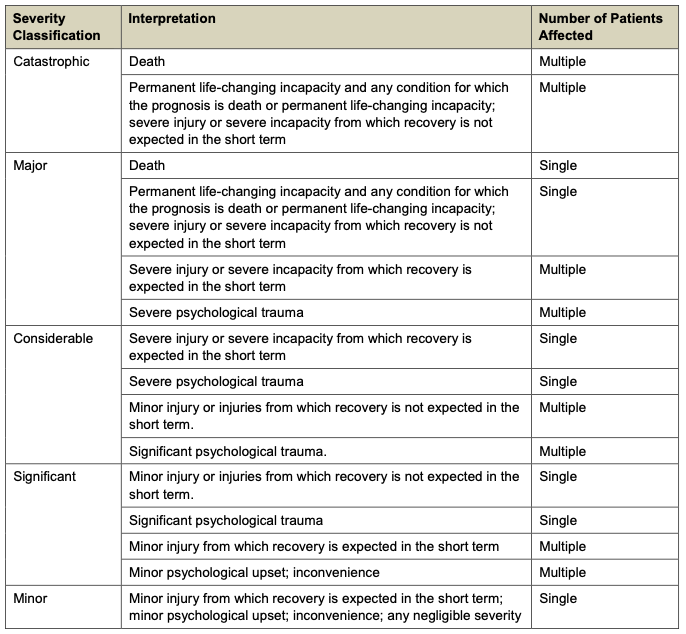
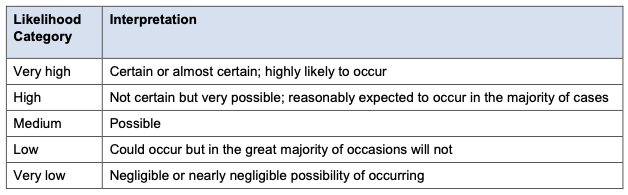
Reference for live hazard scoring. Severity × Likelihood determines the Risk Score (1–5).
Severity Categories
Likelihood Categories
5×5 Risk Matrix
Risk Score Categories